

Google Antigravity is a new kind of coding environment built around autonomous AI “agents” that can plan, run, and verify tasks inside an editor, terminal, and browser. This guide explains, in plain language, what Antigravity is, how it’s different from a traditional IDE like VS Code, and which features matter most by using a simple data-analysis example (Pandas + Matplotlib) so you can see how it helps real work. I’ll end with other tools you might try, like Cursor, and a short FAQ.
Table of Contents
- What is Google Antigravity?
- How Antigravity is different from a traditional IDE (like VS Code)
- Top features that go beyond VS Code
- Data scientist / AI engineer use case: data analysis with Pandas & Matplotlib
- Alternatives and similar tools (Cursor and others)
1. What is Google Antigravity?
Google Antigravity is an agent-first IDE: instead of being a place where you type code and an assistant helps with small completions, Antigravity lets multiple AI agents act semi-autonomously inside the environment to plan, edit, run, and verify work. Agents can access the editor, run commands in the terminal, and even browse the web or record browser sessions; all to complete multi-step tasks with less manual back-and-forth.
Antigravity adds structured outputs called Artifacts; things like task lists, screenshots, even short browser recordings that explain what an agent did and why. That helps the human user understand and verify the agent’s actions instead of just trusting a black-box edit. The overall idea is moving from “AI autocomplete” to “AI teammate that can take responsibility for tasks.”
2. How Antigravity is different from a traditional IDE (like VS Code)
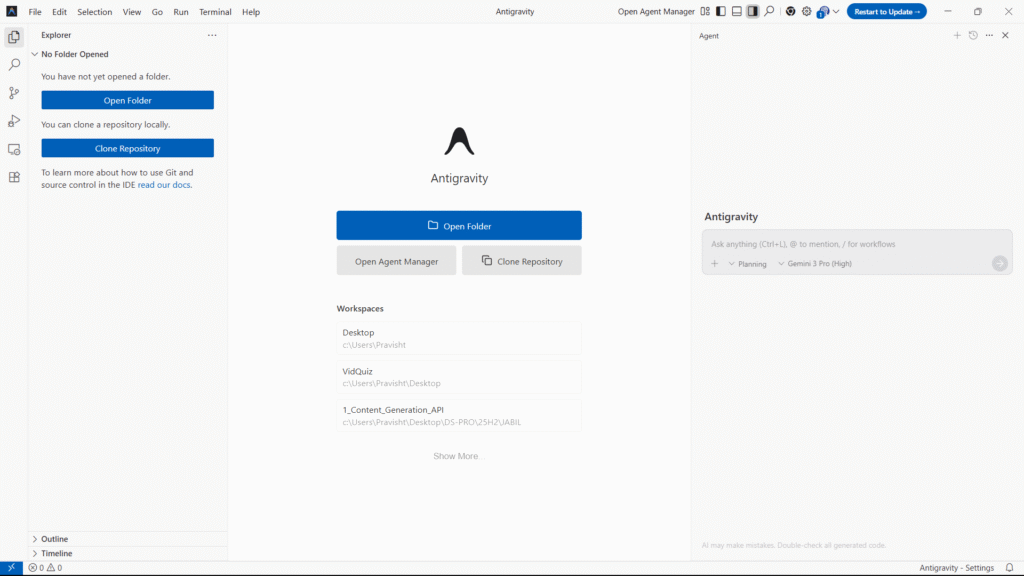
Traditional IDEs (example: Visual Studio Code) are developer tools built around a human typing code, with assistants that give suggestions, snippets, and static analysis. Antigravity keeps the familiar editor look but changes who drives the work: AI agents can initiate tasks, run commands, and use the browser, not just suggest code. This is a shift from human-led editing with AI help to agent-led collaboration with human oversight. In plain terms: VS Code helps you type faster; Antigravity can plan and carry out whole sub-projects and show you what it did.
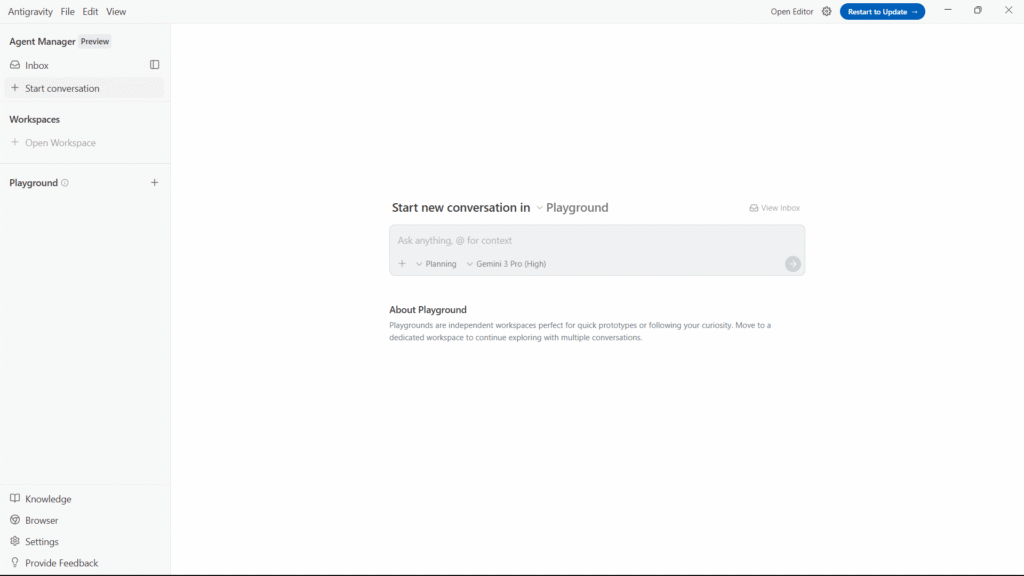
A few practical contrasts: VS Code extensions give inline completions and local refactors; Antigravity agents can run tests, open web pages to fetch data, create a test plan, and present “Artifacts” that document their steps. Antigravity also includes a Manager view; a mission-control style UI to orchestrate and monitor multiple agents that is something standard IDEs do not provide.
3. Top features that go beyond VS Code
a) Agent orchestration (many agents, one mission)
What it is: You can run several AI agents simultaneously or in sequence; each agent can take parts of a task (e.g., one agent writes tests, another fixes bugs, another prepares release notes). The Manager view helps you watch and coordinate these agents.
Why it matters: Complex tasks often need many steps. Instead of switching tools and copying outputs, the IDE coordinates agents and preserves a clear record.
Example: In a data science project, one agent can clean data, another can run analysis code, and another generates plots and a final short report that is all in one orchestrated flow.
b) automatic evidence and logs
What it is: Agents produce Artifacts such as screenshots, task lists, or short browser recordings that show what they did and why. These are easy to review.
Why it matters: Artifacts reduce guesswork. You see the agent’s reasoning and the exact actions it performed, which helps with trust and debugging.
Example: After an agent updates a data processing script, you get a test log artifact that shows the previous failing test, the code change, and the passing result.
c) Deep tool integration (editor + terminal + browser)
What it is: Agents have controlled access to the editor, the terminal, and a browser. They can run commands, fetch data from the web, and edit files in context.
Why it matters: This makes the agent genuinely useful for end-to-end tasks, such as fetching a CSV from a public site, cleaning it, and producing a chart that is all without you manually switching between windows.
Example: For data analysis, an agent can download a dataset, run pip install for a library, execute the notebook or script, and save a PNG of the chart, then attach that PNG as an Artifact.
d) Longer memory and agent learning (retain knowledge across sessions)
What it is: Antigravity agents can keep learned context about a project across runs (within limits and user controls). This lets them get better at recurring tasks.
Why it matters: Repeated tasks (formatting, plotting style, or company conventions) don’t require re-teaching the agent every time. You gain speed and consistency.
Example: The agent remembers your preferred Matplotlib style or column-naming conventions, so each new analysis follows the same format.
e) Multi-model support (Gemini 3 Pro + others)
What it is: Antigravity is built to use Gemini 3 Pro for deep reasoning and also supports other models (Anthropic, open models) so you can pick a model that fits the job.
Why it matters: You get access to a high-performing model for hard planning tasks, while still being able to use cheaper or specialized models when appropriate.
Example: Use Gemini 3 Pro to design a data pipeline and a faster, cheaper model to generate many minor plotting variants.
f) Safety controls and verification (human-in-the-loop)
What it is: The environment emphasizes verification; you review artifacts, comment, and approve agent changes before they merge. Agents cannot quietly push results without user oversight.
Why it matters: This keeps the user in control and helps prevent accidental or malicious changes.
Example: An agent suggests a large refactor to a data pipeline; you review the artifact and run unit tests before accepting changes.
4. Data scientist / AI engineer use case: data analysis with Pandas & Matplotlib
Below is a plain, step-by-step illustration of how Antigravity can help you do a typical data analysis task faster and safer than a traditional IDE workflow.
Scenario: You want to analyze a sales CSV and produce a monthly sales chart.
Traditional workflow (VS Code):
- Open terminal, run git pull.
- Open the CSV in a notebook or script.
- Write Pandas code to clean the data, run it locally.
- Create a Matplotlib plot, tweak labels and style, save a PNG.
- If an error appears, debug, re-run, repeat.
- Manually create a small report and push changes.
This works well, but you must do each step manually.
Agentic workflow (Antigravity):
- Create a “mission” and tell an agent: “Analyze sales_2025.csv: clean missing dates, group by month, plot monthly totals with labels and save monthly_sales.png.”
- One agent downloads the CSV (if remote), inspects columns, and generates a short plan (Artifact) showing the steps it will take. You review and approve.
- The agent runs Pandas commands in the terminal or notebook, writes a data_processing.py file, and includes unit checks. It records outputs and test logs as Artifacts.
- Another agent generates the Matplotlib figure, adjusts style to your saved preference, saves monthly_sales.png, and attaches the image as an Artifact.
- You open the artifact, see the plot, and add a comment requesting a larger font for the axis; the agent updates the code, re-runs, and attaches the new image and test logs.
- When happy, you click to export the exact code the agents used (Python snippet) and commit the change to your repo.
Why this is helpful: Antigravity reduces repetitive hand-tuning and context switching. The agents handle setup (installing packages), run code, and produce verifiable artifacts, while you review and guide them. If the agent makes a wrong assumption, you have a clear artifact trail to correct it.
Concrete benefits for Pandas + Matplotlib work:
- Faster iteration on cleaning and plotting.
- Automatically generated test logs and artifacts for reproducibility.
- Retention of plotting preferences and column-naming rules for future datasets.
- Easier hand-off to collaborators with the same artifacts and exported code.
5. Alternatives and similar tools (short overview)
If you want an agentic or AI-assisted coding experience but prefer different styles or smaller footprints, here are alternatives:
- Cursor: An AI code editor that already had agent-like features and fast inline editing. Cursor focuses on quick edits and a streamlined developer UX; Antigravity is pushing further into agent orchestration and browser control. Early comparisons suggest Cursor remains strong for lightweight, fast iteration, while Antigravity excels at coordinated, multi-step agent tasks.
- Claude Code / Anthropic tools: Offer different model tradeoffs (safety, style). Antigravity can run multiple models, including Anthropic’s Sonnet, for users who want alternatives to Gemini.
- Traditional IDE + Copilot / Tabnine: If you only want inline completion and local refactors, a standard IDE (VS Code) plus an assistant is still a simple, low-risk choice.
Each tool has tradeoffs: speed vs. planning depth, cost vs. accuracy, and local control vs. agent autonomy. Antigravity’s niche is agent orchestration and documented, verifiable autonomous steps backed by high-capability models.
Summary
Google Antigravity is a new agent-first IDE that changes how software is built: AI agents can plan, execute, and verify tasks across the editor, terminal, and browser. Compared with a traditional IDE like VS Code, Antigravity emphasizes agent orchestration, artifact-based verification, long-running context, and deep tool access. For data scientists and AI engineers working with tools like Pandas and Matplotlib, Antigravity can automate repetitive setup, produce reproducible artifacts (plots, logs), and speed up iterations while keeping humans in the review loop. If you value coordinated, multi-step automation and clear evidence of what the AI did, Antigravity is worth trying; if you prefer fast, precise inline edits, alternatives like Cursor remain excellent choices.
FAQ
1. Is Antigravity just a new name for VS Code?
No. Antigravity looks familiar (editor, files, terminal) but is built around agents that can act autonomously across tools. While VS Code focuses on human typing and extensions, Antigravity focuses on agent planning, execution, and artifact logging.
2. Do I need to trust the agent completely to use Antigravity?
No. Antigravity is designed for human-in-the-loop control: agents produce artifacts that document actions and results, and you can review, comment, and approve edits before they become final. This preserves safety and oversight.
3. Can Antigravity run my data scripts, install packages, and save plots automatically?
Yes, agents can run commands in the terminal, install dependencies, execute analysis scripts (Pandas, Matplotlib), and attach output images or logs as Artifacts. You remain in control to review and re-run steps.
4. Should I switch from VS Code to Antigravity right away?
It depends on your needs. If you regularly do single-step coding and prefer fast local edits, VS Code plus AI extensions may still be ideal. If your work involves multi-step automation, repeated workflows, or you want AI to coordinate complex tasks and document each step, Antigravity offers capabilities that can boost productivity and reproducibility.
Thanks for your time! Support us by sharing this article and exploring more AI videos on our YouTube channel – Simplify AI
Leave a Reply